Search filter
10 results found

… pending or not. All pending alarm signals must be removed for complete alarm reset. … can be deactivated, line break and short-circuit are no longer recognised! This means setting a terminating resistance is superfluous. Reset key button (Concerns the reset key button directly on the CM module) [] Reset alarm status As standard, brief confirmation of the key button only resets the smoke detector of the smoke detector lines of the smoke zone (smoke detector reset see „Operating parameters (GEZE internal All Licence)“). When the option is activated, the alarm is also reset in the assigned smoke zones and all the drive modules are actuated to „close“. àà Please check how meaningful this function is if the module detector lines are used for different smoke zones. àà If „Reset alarm status“ is activated, the alarm status is only reset and the drive modules actuated to „close“ when all pending alarm signals have been removed. … .3 Operating mode [•] Standard motor [] Magnetic clamp operation This mode is designated for standard 24V drives on ventilation flaps and windows. The change in direction is achieved by reversing the polarity of the supply voltage. The drive lines are only supplied (for the duration of the drive line switch-off time) when an OPEN or CLOSE signal is pending. In the event of an alarm, the post cycle control is also active (see CM „Operating parameters“). This mode is designated for the connection of magnetic clamps. The module only reacts to alarm commands. The LED „Window OPEN“ on the module and on any vent switch (without function!) connected lights up red in idling state. The LED indicator „Window OPEN“ on the fire button is not active. Note: àà In magnetic clamp mode the maximum current must be taken into account (30% of the power supply). The battery movement time must be calculated separately. When current is permanently tapped, a back-up time of 72 h can no longer be achieved. Mixed designs (drives and magnetic clamps) require particular consideration. àà This setting requires the alarm direction of travel „Emergency-open“. Important note: àà If a DM with magnetic clamp mode is connected to a control unit, the LED indicator „Window OPEN“ is not active on the fire buttons connected. We recommend using separate control units for standard drives and magnetic clamps. [] Idling state: Drive line actuated ("Open") Alarm state: Drive line off Pressure gas genera- This mode is designated for the connection of pressure gas generators. The module only tor mode reacts to alarm commands. Note: àà If „Impulse duration“ = … sec = permanent operation Restoring a switAfter a higher priority signal has dropped, the drive line is returned to the status of a ched status of lower pending. lower priority signal again. priority Example: A ventilation signal OPEN is pending due to a temperature sensor, the windows are open. A higher priority ventilation signal CLOSE transmitted by a weather station closes the windows. If the ventilation signal of the weather station drops further and the ventilation signal of the temperature sensor is still pending, the windows open again. Emergency-open for wind directions (for SHEV according to EN 12101-2) Specifies the evaluated wind directions for which the system actuates the drive line of the DM in the event of an alarm. [x] [x] [x] [x] [x] [x] [x] [x] 26 N NO O SO S SW W NW The wind direction is evaluated according to VdS 3122. In the event of an alarm and a wind direction during which the windows should not be opened, the windows close if they have been opened by ventilation. This function guarantees a wind direction dependent actuation of SHEVs (natural smoke and heat exhaust ventilators) in the event of an alarm according to EN 12101-2. MBZ 300 Configuration Software DM - Drive module This function is only possible when a weather module is available and the wind direction sensor (wind direction finder) is connected. (see „WM - Weather module“) … .3 Emergency-close (Concerns the green push button „CLOSE/RESET“ in the connected RWA button) [•] [] Emergency-close When the emergency-close push button of the manual detector is actuated, all DMs of the smoke zone are switched to „close“ and the alarm status in the control unit is reset. If a smoke detector reset should be necessary, this must be carried out directly at the module via the „RESET“ push button. Emergency-close and detector line When the emergency-close push button of the manual detector is acreset tuated, all DMs of the smoke zone are switched to „close“ and the alarm status in the control unit is reset. The smoke detectors are also reset. Note: „Emergency-close“ always has the effect of triggering a „CLOSE“ movement and (partly) resets the alarm status, no matter whether alarm signals (e.g. fire alarm system) are pending or not. All pending alarm signals must be removed for complete alarm reset. … .7 Reset button (Concerns the reset key button directly on the SM module) [] Reset alarm status As standard, brief confirmation of the push button only resets the smoke detector of the smoke detector lines of the smoke zone (smoke detector reset -> see „Operating parameters“(GEZE internal All Licence)) . When the option is activated, the alarm is also reset in the assigned smoke zones and all the drive modules are actuated to „close“. àà Please check how meaningful this function is if the module detector lines are used for different smoke zones. àà If „Reset alarm status“ is activated, the alarm status is only reset when all pending alarm signals have been removed. … No additional function No collective fault function is assigned to the relay. Collective fault of all DMs on selected control units Collective fault of all SMs on selected control units Collective fault of all DMs+SMs on selected control units Collective fault of all PMs on selected control units Collective fault of all DMs+PMs on selected control units Collective fault of all SMs+PMs on selected control units Collective fault of all SMs+PMs+DMs on selected control units Faults of all drive modules at selected control units are displayed. Faults of all sensor modules* at selected control units are displayed. Faults of all drive and sensor modules* at selected control units are displayed. Faults of all power modules at selected control units are displayed. Faults of all drive and power modules at selected control units are displayed. Faults of all sensor* and power modules at selected control units are displayed. Faults of all sensor*, drive and power modules at selected control units are displayed. Control unit 0control unit x (in the case of control units networked via CAN) * The „SM sensor modules“ include the control module. For a collective fault to be outputted, at least one control unit must be selected, even if it is a single control unit. The collective fault can be assigned to a relay as a single or additional function. The additional function has a lower priority than the display of smoke zones, ventilation and weather groups. This means: If a collective fault is parameterised for a relay which displays the actuation of a smoke zone, for example, resetting the smoke zone switches the relay off even if a fault is still pending. 38 MBZ 300 Configuration Software ERM relay module … .4 Signalling ventilation signals (venting groups) As soon as a relay module is integrated in a control unit, additional configuration possibilities appear in the venting groups. Here, the statuses of the ventilation can be assigned to the relays. „Open“, „Close“ and „Stop“ are available for each relay. If parameters are set for a relay to display Open or Close, then Open or Close is active until there is either a change in direction of movement or a „Stop“ signal is issued. The stop signal is only pending when the system is stopped manually, i.e. àà Stop by pressing the Open/Close push buttons at the same time, àà Stop by active function „Start/Stop Open/Close push button“ or àà Stop by active biased-off function 39 ERM relay module MBZ 300 Configuration Software àà Automatic switch-off by the drive is not registered as „Stop“. àà Important note: This is an indicator of ventilation signals – not window statuses! Only the vent switch signals are shown. The opening of windows by alarm or closing by alarm resetting is not shown. àà Tip: A real window position can only be mapped by end position contacts (e.g. Reed contacts).
… pending or not. All pending alarm signals must be removed for complete alarm reset. … are thus activated. An alarm is triggered in the event of a line break or short-circuit on detector line 2. Module Reset button (Concerns the reset push button directly on the CM module) [] Reset alert status In the standard setting, pressing the button briefly will only reset the smoke detectors of the module detector lines (for smoke detector reset -> see the chapter “Operating parameters”). When the option is activated, the alarm is also reset in the assigned fire sections and all the drive modules are actuated to “CLOSE”. àà Please check how meaningful this function is if the module detector lines are used for different fire sections. àà If “Reset alert status” is activated, the alarm status is only reset and the drive modules actuated to “CLOSE” when all pending alarm signals have been removed. … .3 DM - Drive module Mode of operation [•] [] Standard motor This mode is designated for standard 24V drives on ventilation flaps and windows. The change in direction is achieved by reversing the polarity of the supply voltage. The drive lines are only supplied (for the duration of the drive line switch-off time) when an OPEN or CLOSE signal is pending. In the event of an alarm, post cycle control is also active unless it has been deactivated. No post cycle control With the MBZ 300, post cycle control means CLOSE for … s = Permanent operation [] Restoring a switched After a higher priority signal has dropped, the drive line is returned to the status of a pendstatus of lower ing lower priority signal again. priority Example: A ventilation signal OPEN is pending due to a temperature sensor, the windows are open. A higher priority ventilation signal CLOSE transmitted by a weather station closes the windows. If the ventilation signal of the weather station drops further and the ventilation signal of the temperature sensor is still pending, the windows open again. 27 DM - Drive module MBZ 300 Configuration software Note: It is not possible to use motor lines with different modes of operation in one joint alarm group. However, new alarm groups with the same sensor lines and different motor lines can be formed, so that only the same modes of operation are always present in one group. … .8 Status contacts The drive module has two inputs for which parameters can be set and at which status contacts can be connected. The type of contact can be selected: àà Closer contact àà Opener contact How to process the pending status contacts is set under this menu item. Status contact 1: Selection Not available End position status CLOSE End position status flashes CLOSE Disable input OPEN Disable input CLOSE Disable input OPEN CLOSE Switch ERM Function The status contact is ignored. The “CLOSE” end position is indicated by the green LED on the vent switch. During closing movement the LED is dark. The yellow LED “Window OPEN” on the RWA button is switched off permanently. As “End position status CLOSE”. The yellow LED “Window OPEN” on the RWA button is switched off permanently. The specific LED flashes during closing movement. Movement “OPEN” is blocked. Movement “CLOSE” is blocked. Movement in the “OPEN” and in the “CLOSE” direction is blocked. If an ERM is used, this input appears in the ERM properties for selection of the relay. If this input is active (contact closed), the selected relay is switched. 29 DM - Drive module Status contact 2: MBZ 300 Configuration software Not available The status contact is ignored. End position status OPEN The “OPEN” end position is indicated by the red LED on the vent switch. During opening movement the LED is dark. The yellow LED “Window OPEN” on the RWA button is switched on permanently. End position status flash- As “End position status OPEN” es OPEN The yellow LED “Window OPEN” on the RWA button is switched on permanently. The specific LED flashes during opening movement. Disable input OPEN Disable input CLOSE Disable input OPEN CLOSE Switch ERM Movement “OPEN” is blocked. Movement “CLOSE” is blocked. Movement in the “OPEN” and in the “CLOSE” direction is blocked. If an ERM is used, this input appears in the ERM properties for selection of the relay. If this input is active (contact closed), the selected relay is switched. Using the end position statuses The end position statuses are used as a clear indicator of end positions on the vent switch and RWA button. End position contacts must be available on the window / from the drive. Special features with only one end position status: If only one of the end position statuses is used, only the respective LED on the vent switch reacts to the status. The other LED behaves as in operation without end position statuses. àà When “end position status OPEN” or “end position status CLOSE” is selected, the respective selection is automatically set to “alternative function” and the drop-down menu is deactivated. àà Please note: If a different selection is made afterwards, the respective LED function must be set manually to “standard function”. Using the disable inputs Use of the status contacts as disable inputs temporarily blocks movement in order to avoid collisions between windows and shade systems, for example. The inputs are active both in ventilation and alarm mode. (However, please refer to the special features of alarm mode.) As long as a disable input is active, no movement takes place in the respective direction. When the input disable has been deactivated, movement begins automatically. Special features of alarm mode: If a disable input is not disabled until after an alarm has been triggered, it is ignored. This is to avoid a broken cable occurring in an alarm case preventing the window opening. The connection of the disable input to a relay which is actuated by the control unit in the event of an alarm is not possible since disabling would be too late due to the switching time of the status input relay. Special features of hold-open magnet mode: In hold-open magnet mode only “Disable input OPEN” has a function. Since the hold-open magnet transmits “OPEN” permanently in idling status and is switched off in the event of an alarm, the disable input disables switchoff in this case. Otherwise the function corresponds to the behaviour in standard motor mode. Influence on times: Drive line switch-off time: Switch-on and changeover delay: Runtime: Ventilation duration: Interval mechanism: Is restarted after every release. Is restarted after release. Is interrupted after disable. Is restarted after disable as long as necessary until a release is available when the time expires. Interval time is not interrupted by disable. Special features for power failure “Close all windows”: If the disable input is disabled, closing movement remains disabled despite subsequent release until mains power is restored. When disable input OPEN, CLOSE or OPEN CLOSE is selected, “Disable mode active” appears in the operating mode menu. In the runtime menu the line “Disable inputs will be ignored in the emergency-OPEN case after ...sec” is released for setting. 30 MBZ 300 Configuration software ATTENTION DME drive module - extended version Please make sure when using the disable inputs (particularly for sequence control) that you use the switching contacts correctly and proceed with corresponding care during testing. The reliability of the RWA system must be safeguarded. There is a residual risk: if the disable input is not cleared in the alarm case the windows cannot be opened. If for sequence control a time is set after which the disable inputs are ignored, collisions can occur between e.g. windows and shade systems. The system must be coordinated with the fire protection planner responsible. Ignore disable inputs The disabling of emergency-OPEN movement by a faulty contact in the event of an alarm should be avoided, or if release is given after a delay in the alarm case you can set that the disable input can be overridden after a certain time here and the movement is still started. [] Disable inputs are ignored in emergency-OPEN cases after: 0...999 s (standard: … .3 RWA Reset button (Concerns the green push button “CLOSE/RESET” in the connected RWA button) [] Display fault [] Suppress fault [] Alarm triggering in the event of a fault Reset and close [•] [] Reset, close and detector line reset This activates fault evaluation (line monitoring) of the reset line. Cable break and short-circuit (after 30 s) are detected. This deactivates the fault evaluation (line monitoring) of the reset line. Line break and short-circuit are no longer detected. This means setting a terminating resistance is superfluous. An alarm is triggered on a reset line in the event of cable break or short-circuit (after 30 s). When the emergency-CLOSE push button of the manual detector is actuated, all DMs of the fire section are switched to “CLOSE” and the alarm status in the control unit is reset. If a smoke detector reset should be necessary, this must be carried out directly at the module via the “RESET” push button. When the emergency-CLOSE push button of the manual detector is actuated, all DMs of the local fire section are switched to “CLOSE” and the alarm status in the control unit is reset. The smoke detectors are also reset. “Emergency-CLOSE” always has the effect of triggering a “CLOSE” movement and (partly) resets the alarm status, no matter whether alarm signals (e.g. fire alarm system) are pending or not. All pending alarm signals must be removed for complete alarm reset. … .7 Module Reset button (Concerns the reset push button directly on the CM module) [] Reset alert status In the standard setting, pressing the button briefly will only reset the smoke detectors of the module detector lines (for smoke detector reset -> see the chapter “Operating parameters”). When the option is activated, the alarm is also reset in the assigned fire sections and all the drive modules are actuated to “CLOSE”. àà Please check how meaningful this function is if the module detector lines are used for different fire sections. àà If “Reset alert status” is activated, the alarm status is only reset and the drive modules actuated to “CLOSE” when all pending alarm signals have been removed. … No additional function No common fault function is assigned to the relay. Common fault of all DMs on selected control units Common fault of all SMs on selected control units Common fault of all DMs+SMs on selected control units Common fault of all PMs on selected control units Common fault of all DMs+PMs on selected control units Common fault of all SMs+PMs on selected control units Common fault of all SMs+PMs+DMs on selected control units Faults of all drive modules on the selected control units are displayed. Faults of all sensor modules* on the selected control units are displayed. Faults of all drive and sensor modules* on the selected control units are displayed. Faults of all power modules on the selected control units are displayed. Faults of all drive and power modules* on the selected control units are displayed. Faults of all sensor* and power modules on the selected control units are displayed. Faults of all sensor*, drive and power modules on the selected control units are displayed. Control unit 0control unit x (in the case of control units networked via CAN) * The “SM sensor modules” include the control module. For a common fault to be outputted, at least one control unit must be selected, even if it is a single control unit. The common fault can be assigned to a relay as a single or additional function. The additional function has a lower priority than the display of fire sections, ventilation and weather groups. This means: If a common fault is parameterised for a relay which displays the triggering of a fire section, for example, resetting the fire section switches the relay off even if a fault is still pending. … .5 Signalling ventilation signals (ventilation groups) As soon as a relay module is integrated in a control unit, additional configuration possibilities appear in the ventilation groups. Ventilation signals Here, the statuses of the ventilation can be assigned to the relays. “OPEN”, “CLOSE” and “Stop” are available for each relay. If parameters are set for a relay to display OPEN or CLOSE, then OPEN or CLOSE is active until there is either a change in direction of movement or a “Stop” signal is issued. The stop signal is only pending when the system is stopped manually, i.e. àà stop caused by activating OPEN/CLOSE button at the same time àà stop caused by the active function “Start/stop OPEN/CLOSE button” or àà stop caused by active biased-off function. àà Automatic switch-off by the drive is not registered as “Stop”. àà Important: This is an indicator of ventilation signals – not window statuses! Only the vent switch signals are shown. The opening of windows by alarm or closing by alarm resetting is not shown. “Window OPEN” (status of a group) Which relay is to signal the group status for “Windows OPEN” can be selected here. àà If all the drive lines are “CLOSED”, the ERM relay is switched on. àà If at least one drive line is not “CLOSED”, the ERM relay is switched off. àà If a relay is selected here, this relay must not be assigned an additional function. àà The status is checked and updated every … .6 Signalling of weather signals As soon as a relay module is integrated in a control unit, additional configuration possibilities appear in the weather groups. Here, the statuses of the weather signals can be assigned to the relays. If a relay parameters are set for the display of “Wind” and/or “Rain”, it is active in “Wind” and/or “Rain” until the weather signal(s) is no longer pending. If the weather group is active, the ERM relay switches. 13 Fire sections The term fire section (or “alarm group”) is used in the context of the MBZ 300 for a group which is activated by specific alarm signals.
… pending or not. All pending alarm signals must be removed for complete alarm reset. … are thus activated. An alarm is triggered in the event of a line break or short-circuit on detector line 2. Module Reset button (Concerns the reset push button directly on the CM module) [] Reset alert status In the standard setting, pressing the button briefly will only reset the smoke detectors of the module detector lines (for smoke detector reset -> see the chapter “Operating parameters”). When the option is activated, the alarm is also reset in the assigned fire sections and all the drive modules are actuated to “CLOSE”. àà Please check how meaningful this function is if the module detector lines are used for different fire sections. àà If “Reset alert status” is activated, the alarm status is only reset and the drive modules actuated to “CLOSE” when all pending alarm signals have been removed. … .3 Mode of operation [•] Standard motor [] Hold-open magnet operation This mode is designated for standard 24V drives on ventilation flaps and windows. The change in direction is achieved by reversing the polarity of the supply voltage. The drive lines are only supplied (for the duration of the drive line switch-off time) when an OPEN or CLOSE signal is pending. In the event of an alarm, post cycle control is also active unless it has been deactivated. This mode is designated for the connection of hold-open magnets. The module only reacts to alarm commands. The LED “Window OPEN” on the module and on any vent switch connected (without function!) lights up red in idling status. The LED indicator “Window OPEN” on the fire button is not active. Note: àà In hold-open magnet mode of operation the maximum current must be taken into account (30% of the power supply). The rechargeable battery running time must be calculated separately. When current is permanently tapped, a back-up time of 72 h can no longer be achieved. Mixed designs (drives and hold-open magnets) must be given special attention. àà This setting requires the alarm direction of travel “Emergency-OPEN”. IMPORTANT: àà If a DM with hold-open magnet mode is connected to a control unit, the LED indicator “Window OPEN” is not active on the fire buttons connected. We recommend using separate control units for standard drives and hold-open magnets. Note: The vent switch function, interval mechanism, restoring a switched status for a lower priority, runtime and ventilation duration are disabled Idling status: Alarm status: 28 Drive line actuated (“OPEN”) Drive line off MBZ 300 Configuration software [] DM - Drive module Pressure gas genera- This mode is designated for the connection of pressure gas generators. The module only tor operation reacts to alarm commands. Note: àà If “Impulse duration” = … min and then OPEN signal again for a total of 30 min. All GEZE window drives have been designed for this post cycle control. Note: The motor line is still activated for the drive line switch-off time after the last post cycle control. Smoke and heat ex- Following an alarm, the alarm is reset by smoke and heat extraction system reset, but traction system reset the windows are not closed automatically. The windows must be closed manually close inactive using the assigned vent switches. Restoring a switched After a higher priority signal has dropped, the drive line is returned to the status of a status of lower pending lower priority signal again. priority Example: A ventilation signal OPEN is pending due to a temperature sensor, the windows are open. A higher priority ventilation signal CLOSE transmitted by a weather station closes the windows. If the ventilation signal of the weather station drops further and the ventilation signal of the temperature sensor is still pending, the windows open again. Note: It is not possible to use motor lines with different modes of operation in one joint alarm group. However, new alarm groups with the same sensor lines and different motor lines can be formed, so that only the same modes of operation are always present in one group. … .8 Status contacts The drive module has two inputs for which parameters can be set and at which status contacts can be connected. The type of contact can be selected: àà Closer contact àà Opener contact How to process the pending status contacts is set under this menu item. 30 MBZ 300 Configuration software Status contact 1: Selection Not available End position status CLOSE End position status flashes CLOSE Status contact 2: DM - Drive module Function The status contact is ignored. The “CLOSE” end position is indicated by the green LED on the vent switch. During closing movement the LED is dark. The yellow LED “Window OPEN” on the RWA button is switched off permanently. As “End position status CLOSE”. The yellow LED “Window OPEN” on the RWA button is switched off permanently. The specific LED flashes during closing movement. Disable input OPEN Disable input CLOSE Disable input OPEN CLOSE Switch ERM Movement “OPEN” is blocked. Disable input OPEN Disable input CLOSE Disable input OPEN CLOSE Switch ERM Movement “OPEN” is blocked. Movement “CLOSE” is blocked. Movement in the “OPEN” and in the “CLOSE” direction is blocked. If an ERM is used, this input appears in the ERM properties for selection of the relay. If this input is active (contact closed), the selected relay is switched. Not available The status contact is ignored. End position status OPEN The “OPEN” end position is indicated by the red LED on the vent switch. During opening movement the LED is dark. The yellow LED “Window OPEN” on the RWA button is switched on permanently. End position status flash- As “End position status OPEN” es OPEN The yellow LED “Window OPEN” on the RWA button is switched on permanently. The specific LED flashes during opening movement. Movement “CLOSE” is blocked. Movement in the “OPEN” and in the “CLOSE” direction is blocked. If an ERM is used, this input appears in the ERM properties for selection of the relay. If this input is active (contact closed), the selected relay is switched. Using the end position statuses The end position statuses are used as a clear indicator of end positions on the vent switch and RWA button. End position contacts must be available on the window / from the drive. Special features with only one end position status: If only one of the end position statuses is used, only the respective LED on the vent switch reacts to the status. The other LED behaves as in operation without end position statuses. àà When “end position status OPEN” or “end position status CLOSE” is selected, the respective selection is automatically set to “alternative function” and the drop-down menu is deactivated. àà Please note: If a different selection is made afterwards, the respective LED function must be set manually to “standard function”. Using the disable inputs Use of the status contacts as disable inputs temporarily blocks movement in order to avoid collisions between windows and shade systems, for example. The inputs are active both in ventilation and alarm mode. (However, please refer to the special features of alarm mode.) As long as a disable input is active, no movement takes place in the respective direction. When the input disable has been deactivated, movement begins automatically. Special features of alarm mode: If a disable input is not disabled until after an alarm has been triggered, it is ignored. This is to avoid a broken cable occurring in an alarm case preventing the window opening. 31 DM - Drive module MBZ 300 Configuration software The connection of the disable input to a relay which is actuated by the control unit in the event of an alarm is not possible since disabling would be too late due to the switching time of the status input relay. Special features of hold-open magnet mode: In hold-open magnet mode only “Disable input OPEN” has a function. Since the hold-open magnet transmits “OPEN” permanently in idling status and is switched off in the event of an alarm, the disable input disables switchoff in this case. Otherwise the function corresponds to the behaviour in standard motor mode. Influence on times: Drive line switch-off time: Switch-on and changeover delay: Runtime: Ventilation duration: Interval mechanism: Is restarted after every release. Is restarted after release. Is interrupted after disable. Is restarted after disable as long as necessary until a release is available when the time expires. Interval time is not interrupted by disable. Special features for power failure “Close all windows”: If the disable input is disabled, closing movement remains disabled despite subsequent release until mains power is restored. When disable input OPEN, CLOSE or OPEN CLOSE is selected, “Disable mode active” appears in the operating mode menu. In the runtime menu the line “Disable inputs will be ignored in the emergency-OPEN case after ...sec” is released for setting. ATTENTION Please make sure when using the disable inputs (particularly for sequence control) that you use the switching contacts correctly and proceed with corresponding care during testing. The reliability of the RWA system must be safeguarded. There is a residual risk: if the disable input is not cleared in the alarm case the windows cannot be opened. If for sequence control a time is set after which the disable inputs are ignored, collisions can occur between e.g. windows and shade systems. The system must be coordinated with the fire protection planner responsible. Ignore disable inputs The disabling of emergency-OPEN movement by a faulty contact in the event of an alarm should be avoided, or if release is given after a delay in the alarm case you can set that the disable input can be overridden after a certain time here and the movement is still started. [] Disable inputs are ignored in emergency-OPEN cases after: 0...999 s (standard: … .3 RWA Reset button (Concerns the green push button “CLOSE/RESET” in the connected RWA button) [] Display fault [] Suppress fault [] Alarm triggering in the event of a fault Reset and close [•] [] Reset, close and detector line reset This activates fault evaluation (line monitoring) of the reset line. Cable break and short-circuit (after 30 s) are detected. This deactivates the fault evaluation (line monitoring) of the reset line. Line break and short-circuit are no longer detected. This means setting a terminating resistance is superfluous. An alarm is triggered on a reset line in the event of cable break or short-circuit (after 30 s). When the emergency-CLOSE push button of the manual detector is actuated, all DMs of the fire section are switched to “CLOSE” and the alarm status in the control unit is reset. If a smoke detector reset should be necessary, this must be carried out directly at the module via the “RESET” push button. When the emergency-CLOSE push button of the manual detector is actuated, all DMs of the local fire section are switched to “CLOSE” and the alarm status in the control unit is reset. The smoke detectors are also reset. “Emergency-CLOSE” always has the effect of triggering a “CLOSE” movement and (partly) resets the alarm status, no matter whether alarm signals (e.g. fire alarm system) are pending or not. All pending alarm signals must be removed for complete alarm reset. … .7 Module Reset button (Concerns the reset push button directly on the CM module) [] Reset alert status In the standard setting, pressing the button briefly will only reset the smoke detectors of the module detector lines (for smoke detector reset -> see the chapter “Operating parameters”). When the option is activated, the alarm is also reset in the assigned fire sections and all the drive modules are actuated to “CLOSE”. àà Please check how meaningful this function is if the module detector lines are used for different fire sections. àà If “Reset alert status” is activated, the alarm status is only reset and the drive modules actuated to “CLOSE” when all pending alarm signals have been removed. … .5 Signalling ventilation signals (ventilation groups) As soon as a relay module is integrated in a control unit, additional configuration possibilities appear in the ventilation groups. Ventilation signals Here, the statuses of the ventilation can be assigned to the relays. “OPEN”, “CLOSE” and “Stop” are available for each relay. If parameters are set for a relay to display OPEN or CLOSE, then OPEN or CLOSE is active until there is either a change in direction of movement or a “Stop” signal is issued. The stop signal is only pending when the system is stopped manually, i.e. àà stop caused by activating OPEN/CLOSE button at the same time àà stop caused by the active function “Start/stop OPEN/CLOSE button” or àà stop caused by active biased-off function. àà Automatic switch-off by the drive is not registered as “Stop”. àà Important: This is an indicator of ventilation signals – not window statuses! Only the vent switch signals are shown. The opening of windows by alarm or closing by alarm resetting is not shown. “Window OPEN” (status of a group) Which relay is to signal the group status for “Windows OPEN” can be selected here. àà If all the drive lines are “CLOSED”, the ERM relay is switched on. àà If at least one drive line is not “CLOSED”, the ERM relay is switched off. àà If a relay is selected here, this relay must not be assigned an additional function. àà The status is checked and updated every … .6 Signalling of weather signals As soon as a relay module is integrated in a control unit, additional configuration possibilities appear in the weather groups. Here, the statuses of the weather signals can be assigned to the relays. If a relay parameters are set for the display of “Wind” and/or “Rain”, it is active in “Wind” and/or “Rain” until the weather signal(s) is no longer pending. If the weather group is active, the ERM relay switches. 46 MBZ 300 Configuration software 13 Fire sections Fire sections The term fire section (or “alarm group”) is used in the context of the MBZ 300 for a group which is activated by specific alarm signals.
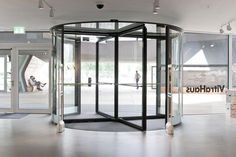
Find the right GEZE revolving door for your needs
… pending Overview of GEZE revolving doors Revo.PRIME/TSA 325 NT variants TSA 325 NT Automatic/Manual TSA 355 Automatic/Manual TSA 395 TSA 395 Multi Revo.PRIME/TSA 325 NT variants TSA 325 NT Automatic/Manual TSA 355 Automatic/Manual TSA 395 TSA 395 Multi A filigree look and a minimum cornice height of up to 75 mm - the new Revo.PRIME revolving door. Automatic/manual revolving door system for three or four-leaf doors with large area of application Depending on the variant: Exceptionally sophisticated appearance thanks to minimum canopy height of up to 75 mm and narrow profile systems Advanced drive technology guarantees high ease of access Effective protection against draughts, the weather and noise Suitable for large numbers of visitors Door can be operated manually, e.g. for cleaning work Can be networked via CAN bus and integrated into building technology management systems Customised production in any desired diameter of 1800 to 3800 mm and in any desired passage height up to 3500 mm in the standard variant (higher on request) Extensive equipment options (e.g. manual/automatic night-time closer, air curtain, floor covering variant, lighting, locking variants, activation and protection elements, etc.) Suitable for escape and rescue routes (TSA 325 NT BO) Available as all-glass solutions (TSA 325 NT GG) Available with burglar resistance (TSA 325 NT RC2) More about the Revo.PRIME More about the TSA 325 NT variants (BO/GG/RC2) Automatic drive for representative building entrances with large incidence of light. © Robert Sprang / GEZE GmbH Automatic/manual revolving door system for three or four-leaf doors with a large area of application Depending on the variant: very smooth-running, low-wear drive solution adjustable automatic speed to suit through traffic suitable for escape and rescue routes (TSA 325 NT BO) all glass versions available (TSA 325 NT GG) burglar resistance (TSA 325 NT RC2) with night-time closer (manual/automatic night-time closer) not barrier-free extensive equipment options interior diameter from 1800 to 3600 mm → Individual variations in any desired diameter and any desired passage height passage height: up to 4000 mm More about the TSA 325 NT Automatic More about the TSA 325 NT Manual Automatic revolving door systems are the first showpiece visitors see in your building's foyer. © GEZE GmbH Automatic/manual revolving door system for three or four-leaf doors, easy to install Depending on the variant: simple installation of the door system without lifting tools fast commissioning thanks to pre-cabled and configured sensors robust and proven drive technology for doors up to 4000 mm diameter with night-time closer (manual night-time closer) extensive equipment options interior diameter from 1700 to 3900 mm passage height: up to 3000 mm individual variations in any desired diameter and in any desired passage height More about GEZE TSA 355 NT Automatic More about GEZE TSA 355 NT Manual Outstanding ease of access for high-traffic areas: Revolving doors with a perfect design and elegance for your building. © GEZE GmbH Automatic revolving door system for three or four-leaf doors with large diameters Depending on the variant: high capacity and good ease of access thanks to large segments powerful drive technology for doors up to 6000 mm diameter simple installation of the door system without lifting tools fast commissioning thanks to pre-cabled and configured sensors extensive equipment options with night-time closer (manual night-time closer) interior diameter from 3900 to 5900 mm Passage height: 2500 mm Individual variations in any desired diameter and in any desired passage height More about GEZE TSA 395 Automatic double leaf revolving door system as a revolving door or sliding door. © GEZE GmbH Automatic double leaf revolving door system with integrated sliding door function Depending on the variant: variable use of the door system as a revolving door or sliding door high capacity and good ease of access thanks to large segments robust and proven drive technology fast commissioning thanks to pre-cabled and configured sensors extensive equipment options with night-time closer (manual night-time closer) not suitable for escape and rescue routes interior diameter from 3500 to 5300 mm (in fixed diameters) passage height: 2500 mm The listed product may not be available in your country. Please contact your GEZE contact person, or send us an e-mail. More about GEZE TSA 395 Multi Related topics and reference projects Topics | Automatic doors Automatic doors Automatic doors make everyday life easier. Not only are they convenient, they save energy too. They facilitate barrier-free access and passage, while meeting the most stringent of safety demands. Read more Hotels & restaurants | References | Accessibility | Building planning | safety Revolving doors at the Address Downtown Hotel Dubai GEZE’s automatic rotating doors with specially adapted door drive solutions ensure the ultimate access convenience and accessibility at the prestigious entrances to this 5-star hotel. Read more Access and security | Topics | Security Building security Comprehensive GEZE security solutions and GEZE access control elements ensure optimal protection for people and goods. Read more Related product knowledge Product knowledge Find the right automatic sliding door GEZE offers the right automatic sliding doors for a wide range of applications. We can find the right door solution with the proper decision criteria. Read more Product knowledge Find the right sliding door fittings GEZE offers a diverse range of sliding door fitting systems for smart partitioning. We can find the right choice with the proper decision criteria. Read more Product knowledge Find the right swing door drive GEZE offers a number of different swing door drives. We help you find the right drives for your automatic doors. Read more
… pending messages (alarm, malfunction, ...) (default setting) Relay Alarm … The built-in relays are only suited for low voltage up to 40V. If 230Vappliances are to be connected, additional relays must be installed downstream by the customer. Jumper position B: Signaling contacts have the function of an opener, i.e. the contact is broken in the case of pending messages. Relay Wind. OPEN
… pending error reports are briefly displayed cyclically (10 s) in operation at the display program switch. Additionally, they are entered in the error memories and . If the dot lights up in the left half of the program display selector screen, then the installation was unable to completely initialize. Either there is an obstruction or something in the installation itself has become jammed. The dot disappears as soon as the door has been opened completely and closed again once. For troubleshooting and elimination, see the fault table. If no errors are displayed during a malfunction, or if the display program switch has no function: Check for active power supply Check cable and cable connections Check the fuses in the control and in the transformer and replace as necessary (see below) Error reports For the list of error messages, see terminal connection diagram 27 Replace fuse in transformer Danger of electric shock! Disconnect the system from the 230 V mains network before removing the board cover.
… pending at the inputs N a, a U , ls and D O . à Locking the door (changing to mode of operation N a) using a potential-free push button or switch is not possible for doors on rescue routes. 40 Automatic sliding doors Mode of operation … A0 54 Drive type, pre-setting is unknown. If parameters have been set for the drive type, this is displayed here, e.g. “SL NT”. Control type Current mode of operation Current status. If a fault is pending, the fault is shown rather than the status. Software version mC1 Software version mC2 (only with DCU1-2M-NT) Hardware version Automatic sliding doors Service menu

Teamleiter Painting and Packaging (m|w|d)
Professional & management roles | Manufacturing | Leonberg