Search filter
17 results found
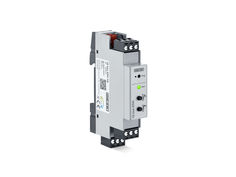
IQ box KNX
Interface module for connecting the Slimchain, Powerchain and E 250 NT window drives in the KNX building bus

Software KNX Product Database IQ box KNX
(Software | 48 KB)
IQ box KNX
GEZE IQ box KNX
(DOCUMENT | 50 KB)
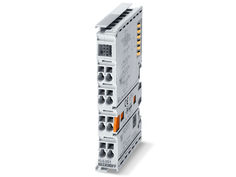
myGEZE Control terminal KNX/EIB
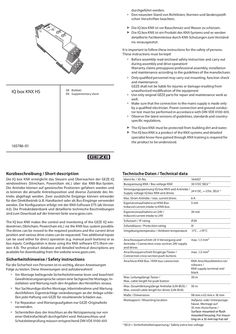
durchgeführt werden. àà Den neuesten Stand von Richtlinien, Normen und länderspezifischen Vorschriften beachten. P ro g XX Ru n XX Die IQ box KNX ist vor Bauschmutz und Wasser zu schützen. Die IQ box KNX ist ein Produkt des KNX-Systems und es werden detaillierte Fachkenntnisse durch KNX-Schulungen zum Verständnis vorausgesetzt. It is important to follow these instructions for the safety of persons. These instructions must be kept! àà Before assembly read enclosed safety instruction and carry out during assembly and drive operation! Warranty claims presuppose professional assembly, installation and maintenance according to the guidelines of the manufacturer. IQ box KNX HS àà Only qualified personnel may carry out mounting, function check and maintenance. GEZE shall not be liable for injuries or damage resulting from unauthorised modification of the equipment àà Use only original GEZE parts for repair and maintenance work as well. àà Make sure that the connection to the mains supply is made only by a qualified electrician. Power connection and ground conductor test must be performed in accordance with DIN VDE 0100-610. àà Observe the latest versions of guidelines, standards and countryspecific regulations. DE Beiblatt EN Supplementary sheet XX XX 165786-01 Kurzbeschreibung / Short description The IQ box KNX must be protected from building dirt and water. The IQ box KNX is a product of the KNX systems and detailed specialist know-how gained through KNX training is required for the product to be understood. Technische Daten / Technical data Die IQ box KNX ermöglicht das Steuern und Überwachen der GEZE IQ windowdrives (Slimchain, Powerchain etc.) über das KNX-Bus-System. Die Antriebe können auf gewünschte Positionen gefahren werden und es können die aktuelle Antriebsposition und diverse Zustände des Antriebs abgefragt werden. Zwei zusätzliche Eingänge können entweder für den Direktbetrieb (z.B. Handtaster) oder als Bus-Eingänge verwendet werden. Die Konfiguration erfolgt mit der KNX-Software ETS (ab Version … ). Die Produktdatenbank und detaillierte technische Beschreibungen sind zum Download auf der Internet-Seite www.geze.com. Ident-Nr. / ID-No. 164437 Busspannung KNX / Bus voltage KNX 30 V DC SELV *) The IQ box KNX makes the control and monitoring of the GEZE IQ windowdrives (Slimchain, Powerchain etc.) via the KNX-bus system possible. The drives can be moved to the required positions and the current drive position and various drive states can be requested. Two additional inputs can be used either for direct operation (e.g. manual push buttons) or as bus inputs. Configuration is done using the KNX software ETS (from version … ). The product database and detailed technical descriptions are available for downloading from the website www.geze.com. Sicherheitshinweise / Safety instructions Für die Sicherheit von Personen ist es wichtig, diesen Anweisungen Folge zu leisten. Diese Anweisungen sind aufzubewahren! àà Vor Montage beiliegende Sicherheitshinweise lesen und beachten! Gewährleistungsansprüche setzen eine fachgerechte Montage, Installation und Wartung nach den Angaben des Herstellers voraus. àà Nur Sachkundige dürfen Montage, Inbetriebnahme und Wartung durchführen. Eigenmächtige veränderungen an der Anlage schließen jede Haftung von GEZE für resultierende Schäden aus. àà Für Reparatur- und Wartungsaufgaben nur GEZE-Originalteile verwenden. Versorgungsspannung IQ box KNX und Antriebe / 24 V DC, +-25%, SELV *) Supply voltage IQ box KNX and drives Max. Strom Antriebe / max. current drives 6A Eigenstromaufnahme an KNX-Bus Induced current intake to KNX-bus … mA Eigenstromaufnahme an 24V / Induced current intake to 24V 20 mA Schutzart / IP rating IP20 Schutzklasse / Protection rating III Umgebungstemperatur / Ambient temperature -5°C…+70°C Anschlussquerschnitt 24 V-Versorgung und Antriebe / Connection cross-section 24V supply and drives Anschlussquerschnitt Eingänge/Taster / Connection cross-section push buttons max. 1,5 mm² Anschluss KNX-Bus / KNX-bus connection KNX-Anschlussklemme rot/ schwarz / KNX supply terminal red/ black 30 m Max. Leitungslänge Taster / Max. cable length for push button max. 1,5 mm² Max. Gesamtleitungslänge Antriebe (LIN-BUS) / Max. overall cable length for drives (LIN-BUS) 50 m Maße / Dimensions 98 mm x 62 mm x 18 mm Montageort / Mounting location Aufputz- oder Unterputzgehäuse. Montage auf 35 mm-Hutschiene / Surface-mounted or flush mounted housing. For mounting on a 35 mm top hat rail àà Sicherstellen dass der Anschluss an die Netzspannung nur von einer Elektrofachkraft durchgeführt wird. Netzanschluss und Schutzleiterprüfung müssen entsprechend DIN VDE 0100-610 *) SELV = Sicherheitskleinspannung / Safety extra-low voltage Elektrischer Anschluss / Electrical connection Anschlussplan IQ windowdrives ID 148327 beachten ! Nur verwendbar mit GEZE IQ windowdrives ab Software … . Heed the wiring diagram for IQ windowdrives ID 148327. Can only be used with GEZE IQ windowdrives from software version … onwards. KNX KNX … Die Gesamtkabellänge zwischen IQ box KNX und Fenster darf max. 50 m betragen. Bei Syncro- oder Verriegelungsantrieben zählen alle einzelnen Antriebsleitungen. Fenster / window … 5 … The overall cable length between IQ box KNX and window must not exceed max. 50 m. With Synchro or locking drives, all the individual drive cables count. … 2 *) Bei 24 V DC und langer Zuleitung muss das Kabel einen genügend großen Querschnitt aufweisen, um einen Spannungsabfall vorzubeugen. Querschnitt berechnen! … *) … 7 Optional weitere Slaveantriebe (bei Syncro) oder Verriegelungsantriebe / Optional further Slave drives (with Syncro) or locking drives / Zusätzliche Abzweigdose für Anschluss mehrerer Antriebe / Additional branch box for the connection of several drives Netzteil 24V DC / 24V DC power supply IQ windowdrive Eingang S33 (Fenster ZU); parametrierbar / Input S33 (window CLOSED); parameters can be set Eingang S32 (Fenster AUF); parametrierbar / Input S32 (window OPEN); parameters can be set z. B. Lüftertaster LTA-24-AZ / e.g. Vent switch LTA-24-AZ … 9 10 Taste Fenster ZU / Window OPEN key Taste Fenster AUF / Window CLOSED key Status LED (grün) / Status LED (green) … 3 … 4 … AC … Bedienelemente / Operating elements Dauerlicht / Continuous light: Blinken langsam / Slow flashing : Blinken schnell / Fast flashing: 11 12 10 … 11 … In the case of 24 V DC and a longer power supply line, the cable must have a sufficiently large cross-section in order to prevent a voltage drop. Calculate the cross-section. 12 Funktion ok / Function OK keine Kommunikation zum Antrieb / No communication to the drive Versorgungsspannung verpolt / Polarity of supply voltage reversed KNX Programmier-LED (rot) für Inbetriebnahme KNX-BUS / KNX programming LED (red) for commissioning KNX-BUS KNX Programmiertaste für Inbetriebnahme KNX-BUS / KNX programming key for commissioning KNX-BUS Zubehör / Accessories Material / Material Ident-Nr. / ID-No. Antriebe / Drives GEZE IQ windowdrives: ab SW … Slimchain, Powerchain, E 250 NT, E 90x, Power lock Lüftertaster / Vent switch LTA-24-AZ LTA-LSA ID 129393 ID 118476 Netzteile / Power supplies NT 1,1A-24 V UP NT 1,5A-24 V HS NT 2,5A-24 V HS NT 4,2A-24 V HS ID 151426 ID 151425 ID 151424 ID 151423 Gehäuse / Housing GEZE Aufputz-Gehäuse / GEZE surface-mounted housing 193 x 130 x 82 mm ID 152010 Testbetrieb / Test operation Nach Anschluss der Antriebe und der 24V-Versorgungsspannung kann mit Hilfe der Taste “Fenster AUF” (9) und der Taste „Fenster ZU“ (8) ein Probelauf der Antriebe durchgeführt werden, auch wenn das KNX-System noch nicht programmiert ist. Following connection of the drives and the 24V supply voltage, the key “Window OPEN” (9) and the key “Window CLOSED” (8) can be use to carry out a test run, even if the KNX system has not been programmed at this point. GEZE GmbH Reinhold-Vöster-Strasse 21–29 71229 Leonberg Germany Tel.: 0049 7152 203-0 Fax: 0049 7152 203-310 www.geze.com

P ro g Ru n IQ box KNX 166560-01 EN Commissioning manual GEZE IQ Box KNX Contents … 1 About this document … Product description and compatibility … Further documents … Symbols and illustrations … 2 Safety notices … 3 Product overview … Technical data … Designs and installation possibilities … Accessories … 4 Electrical connection … IQ box KNX flush mounting wiring diagram … IQ box KNX top hat rail wiring diagram … 5 Test operation and commissioning of the IQ windowdrives … … .1 … .2 Test operation … KNX commissioning … Load ETS product database IQ box KNX … Assign physical address of the IQ box KNX … 6 Overview of the KNX communication objects of the IQ box KNX … 7 Set parameters of the IQ box KNX functions using the ETS … … .1 … .2 … .3 … .4 … .5 … .6 … .7 Description of the functions … IQ box KNX set parameters – ETS menu … 11 Common … 11 Movement … 12 Automatic … 13 State … 14 Alert … 15 External button . … 16 Service … 17 … Application examples … 18 … Troubleshooting … 21 GEZE IQ Box KNX … About this document The Commissioning manual is a supplement to the addendum of the IQ box KNX. It provides comprehensive documentation about the commissioning and setting parameters of the GEZE IQ box KNX. Knowledge of the KNX Bus System and of the KNX ETS software from version … is required for setting the parameters and for integrating the IQ box KNX into a KNX bus system. … Product description and compatibility The IQ box KNX makes the control and monitoring of the GEZE IQ windowdrives (Slimchain, Powerchain, E 250 NT, Power lock, etc.) via the KNX-bus system possible. The drives can be moved to the required positions and the current drive position and various drive states can be requested. Two additional binary inputs can be used either for direct operation (e.g. manual push buttons) or as bus inputs. Configuration is done using the KNX software ETS (from version … ). The ETS product database can be downloaded via the internet from www.geze.com or directly from www.iq-box-knx.geze.de. The IQ windowdrives used for operating the IQ box KNX must have software version … or higher. The SW ver- sion of the drives is shown on the packaging label and on the identification plate. … Further documents àà IQ box KNX leaflet The leaflet is enclosed with the IQ box KNX and contains the most important product information and instructions about the electrical connection and about commissioning of the IQ box KNX. àà IQ windowdrives installation instructions The installation instructions are enclosed with the IQ windowdrives and contain information about installing the IQ windowdrives. àà IQ windowdrives wiring diagram The wiring diagram is also enclosed with the IQ windowdrives and contains information about the electrical connection of the IQ windowdrives. All documents can also be found on the internet at www.geze.com. … Symbols and illustrations Warning notices Warning notices are used in these instructions to warn you of property damage and personal injury. XX Always read and observe these warning notices. XX Follow all measures that are labelled with the warning symbol and warning word . Warning symbol – Warning word Meaning ATTENTION Danger to persons. Non-compliance can result in death or serious injuries. CAUTION Danger to persons. Non-compliance may lead to minor injuries. CAUTION Information to prevent property damage, to understand or optimise the operation sequences. More symbols and illustrations Important information and technical notes are highlighted to explain correct operation. Symbol Meaning means “important note” means “additional Information” XX Symbol for an action: there is something you must do here. If there are several actions to be taken, keep to the given order. … … GEZE IQ Box KNX Safety notices ATTENTION Windows, which can be controlled with the IQ box KNX via the KNX Bus, must not be used in smoke and heat extraction systems. Area of use for the IQ box KNX is natural ventilation CAUTION For automatically controlled windows, which are fitted at heights below … m, appropriate safety measures to secure against crush and shearing edges must be taken within the framework of a safety analysis To ensure personal safety, it is important to follow these safety instructions. These instructions must be kept. àà Before installation, read and observe the enclosed safety notes. Warranty claims require proper mounting, installation and maintenance in accordance with the manufacturer's specifications. àà Only appropriately qualified people may carry out installation, commissioning and maintenance. Unauthorised modifications to the system release GEZE from liability for any resulting damages. àà Only use GEZE original parts for repair and service work. àà Ensure that the connection to the power supply is only carried out by a qualified electrician. The power connection and safety earth conductor test must be carried out in accordance DIN VDE 0100-610. àà Observe the latest versions of guidelines, standards and country-specific regulations. àà The safety notices in the IQ windowdrives ID 148327 wiring diagram must be observed! XX XX The IQ box KNX must be protected from building dirt and water. The IQ box KNX is a product of the KNX systems and detailed specialist know-how gained through KNX training is required for the product to be understood. … Product overview … Technical data … Bus voltage KNX 30 V DC SELV *) Supply voltage IQ box KNX and drives 24 V DC, +/-25%, SELV *) Max. current drives 6A Induced current intake to KNX-bus … mA Induced current intake to 24V 20 mA IP rating IP20 Protection rating III Ambient temperature -5°C…+70°C Connection cross-section 24V supply and drives max. 1,5 mm² Connection cross-section inputs/push buttons, rigid or flexible without wire-end ferrule KNX-bus connection max. … mm² Max. cable length for push buttons 30 m Max. overall cable length for drives (LIN-BUS) 50 m KNX supply terminal red/black GEZE IQ Box KNX … Designs and installation possibilities Two versions of the IQ box KNX are available UP (flush mount) and HS (top hat rail). The overall cable length between IQ box KNX and window must not exceed max. 50 m. With Synchro or locking drives, all the individual drive cables count. … .1 … .2 IQ box KNX flush mounting – Design for flush mounting installation IQ box KNX flush mounting Power supply … A - 24 V flush-mounting Electronic standard box Flush mounting switch box, 60 mm deep Dimensions IQ box KNX flush mounting: 50 mm x 45 mm x 19 mm Installation location: Standard box insulation material (DIN 49073 ) Mounting sequence: not relevant Mounting sequence: 230 V internal, 24 V external IQ box KNX top hat rail – fitting to top hat rail IQ box KNX top hat rail Power supply NT … - … A - 24 V HS GEZE surface housing ID 152010 with 35 mm top hat rail for … modules Pro g Ru n Dimensions IQ box KNX top hat rail: 98 mm x 62 mm x 18 mm Installation location: Surface or flush mounting housing on 35 mm top hat rail. … A maximum of … IQ box KNX HS and the … A power supply ID 151424 can be installed in a GEZE surface housing. The housing can be expanded as required for further top hat rail power supplies + IQ box KNX HS. Accessories Material Identification no. Drives GEZE IQ windowdrives: from SW … Slimchain, Powerchain, E 250 NT, E 90x, Power lock Vent switch LTA-24-AZ LTA-LSA ID 129393 ID 118476 Power supplies NT 1.1A-24 V UP NT 1.5A-24 V HS NT 2.5A-24 V HS NT 4.2A-24 V HS ID 151426 ID 151425 ID 151424 ID 151423 Housing Surface housing ID 152010 … GEZE IQ Box KNX … Electrical connection … IQ box KNX flush mounting wiring diagram … Fenster/ window A B S L … A B S L … 2 max. … A + 230V AC + 24 V DC … A B - S LIN - GND +24V A B S L *) … 9 10 IQ box KNX KNX -+ COM 32 33 … 6 … 11 KNX + -- 12 + -KNX IQ box KNX top hat rail wiring diagram KNX KNX … Fenster/ window … 5 … 1 … 4 11 10 … AC … 8 12 GEZE IQ Box KNX … 2 … 4 … 6 … 8 … 10 Optional further Slave drives (with Syncro) or locking drives Additional branch box for the connection of several drives Power supply 24V DC IQ windowdrive Input S33 (window CLOSED); parameters can be set Input S32 (window OPEN); parameters can be set e.g. Vent switch LTA-24-AZ Window OPEN key Window CLOSED key Status LED (green) Continuous light Slow flashing Fast flashing 11 12 *) Function OK No communication with drive supply voltage polarity reversed KNX programming LED (red) for commissioning KNX-BUS KNX programming key for commissioning KNX-BUS In the case of 24 V DC and a longer power supply line, the cable must have a sufficiently large cross-section in order to prevent a voltage drop. Calculate the cross-section. The overall cable length between IQ box KNX and window must not exceed max. 50 m. With Synchro or locking drives, all the individual drive cables count. Note the wiring diagram for IQ windowdrives ID 148327. Can only be used with GEZE IQ windowdrives from software version … onwards. … Test operation and commissioning of the IQ windowdrives … Test operation Following connection of the drives and the 24 V supply voltage, the key “Window OPEN” (9) and the key “Window CLOSED” (8) (see fig. IQ box KNX top hat rail + flush mounting) can be use to carry out a test run, even if the KNX system has not been programmed at this point. Note: short button press = step mode, long button press = self-hold mode If the IQ windowdrives are being operated for the first time, the closing position of the window is detected during the first closing procedure and is saved automatically. Should the drive reverse after reaching the closing position (drive opens by approximately 15 mm), a commissioning run must be started. See wiring diagram for IQ windowdrives ID 148327. With the chain drives Slimchain/Powerchain, the ventilation stroke ex works is limited to 300 mm in the software of the drives. In KNX mode, the maximum pre-set ventilation stroke can be approached. The ventilation stroke can be adjusted in the drive software via the GEZE ST 220 and the GEZE service case. The maximum ventilation stroke is prescribed by the nominal stroke of the drives. … KNX commissioning The KNX bus cable and the 24 V supply must be connected for the commissioning of the IQ box KNX. The drives can also be connected subsequently. … .1 Load ETS product database IQ box KNX In order to set the parameters of the IQ box KNX via the ETS software (from version … ), the product database file must be loaded. The ETS product database can be downloaded via the internet from www.geze.com or directly from www.iq-box-knx.geze.de. … .2 Assign physical address of the IQ box KNX From the factory, the IQ box KNX has the physical address … .255. In the KNX-Bus-System, an individual physical address must be specified for each KNX participant using the ETSasoftware. Before or during the programming procedure of the physical address, the KNX programming button (11) of the IQ box KNX must be pressed. KNX programming LED turns red. No other KNX participants may be in programming mode while assigning the address. … … GEZE IQ Box KNX Overview of the KNX communication objects of the IQ box KNX Object no. Object name Operation and automatic … Window - Drive command … Window - Drive command … Window - Position … Window - Gap ventilation … Window - Time ventilation … Window - Lock … 7 Window - Lock … 8 Automatic - Drive command … Automatic - Lock 10 Window - Speed next drive 11 Window - Actual position 12 Window - Position between 13 Window - Opened 14 Window - Closed 15 Window - Not closed 16 Window - Do open 17 Window - Do close Alarm 21 Alert - Safety 22 Alert - Wind speed 23 Alert - Wind alert 24 Alert - Rain alert External push button 31 Button … (Cl.33) - Drive command 32 Button … (Cl.33) - Drive command 33 Button … (Cl.33) - Position 34 Button … (Cl.32) - Drive command 35 Button … (Cl.32) - Drive command 36 Button … (Cl.32) - Position Service 41 Service - Check unit 42 Service - Error unit 43 Service - Error collection R T Flags: … Function DPT Flags Length Direction Open/Close Step/Stop Value [%] Trigger Trigger Switch Switch Open/Close Switch Value [%] State value [%] State State State State State State … CW CW CW CW CW CW CW CW CW CW CT CT CT CT CT CT CT … Bit … Bit … Byte … Bit … Bit … Bit … Bit … Bit … Bit … Byte … Byte … Bit … Bit … Bit … Bit … Bit … Bit IN IN IN IN IN IN IN IN IN IN OUT OUT OUT OUT OUT OUT OUT R R R T T T T R T R T T T T T T T Switch Value [m/s] Switch Switch … CS CS CS CS … Bit … Byte … Bit … Bit IN IN IN IN R T R R Open/Close Step/Stop Value [%] Open/Close Step/Stop Value [%] … CT CT CT CT CT CT … Bit … Bit … Byte … Bit … Bit … Byte OUT OUT OUT OUT OUT OUT T T T T T T State State State byte … CT CT CT … Bit … Bit … Byte OUT OUT OUT T T T Standard object Object becomes active by setting the parameter K = Communication S = Write Ü = Transmit GEZE IQ Box KNX … Set parameters of the IQ box KNX functions using the ETS Use the ETS software to set parameters of the IQ box KNX. … Description of the functions ETS parameters menu item General information Function Description Energy-saving mode General information General information General information Operation Reaction to a bus power failure Reaction after restoration of power Status delay after restoration of power Manual controls After an adjustable waiting period, the IQ box KNX enters energy-saving mode. The drives are switched to energy-saving mode and are only re-activated with the next movement command. Behaviour of the drives if the KNX bus power fails Operation Speed Manual controls Behaviour of the drives after restoration of power In order to reduce the bus load after restoration of power, a status transmission delay can be set here There are several possibilities for the manual controls via KNX: àà Addressing the movement command Open/Close (KNX Com. Object # 1) àà Addressing the movement command Open/Close (KNX Com. Object # 1) and Stop (KNX Kom. Object # 2) longterm and short-term function for blinds operation àà Addressing the movement command target position by stating percentage (KNX Com. Object # 3) Open/Close speed as a percentage of the max. ventilation speed of the drive in manual mode (actual max. ventilation speed depending on load). To secure windows against jamming, a leaf speed of < … mm/s can be required within the framework of a safety analysis. Operation Interval ventilation Operation Gap ventilation Operation Timed ventilation Operation Block window Automatic Automatic mode Automatic Speed automatic Drive noise increases as speeds increase. Settable step width in %, by which the window is moved when opening or closing when pressing the button. Additional pushes of the button are accumulated. Interval ventilation can be controlled using the blinds function like the normal manual controls. Open/Close over long-term operation and Step/Stop over short-term operation. When triggering the gap ventilation function, the window is opened to a settable window position in %. When the timed ventilation function is triggered, the window is opened to a window position settable in % and automatically closes again after the end of a settable ventilation period. … block objects, with which the window is closed in manual mode. Unblocking takes place via the block object. E.g. for sequence controls with sun protection, blocking the window if heating or air-conditioning is switched on. For automatic control of the windows, e.g. via a central KNX room/building control unit with defined speed. Lower priority as manual mode Open/Close speed as percentage of the max. ventilation speed of the drive in automatic mode. (actual max. ventilation speed depending on load) To secure windows against jamming, a leaf speed of < … mm/s can be required within the framework of a safety analysis. Drive noise increases as speeds increase. … GEZE IQ Box KNX Automatic Block automatic Status messages Status messages Send current position Send status messages Alarm Reaction to safety alarm Alarm Wind alarm/Rain alarm External push button Push button Service Service Maintenance message Fault message Block object, with which opening, closing or opening and closing of the window is blocked in automatic mode. Unblocking takes place via the block object. Alternatively, via a settable blocking time. E.g. for sequence controls with sun protection, blocking the windows if heating or air-conditioning are switched on. The drive position is sent after a settable position change in %. During a change, or after a settable cycle time, the following status messages are sent by the window: àà Temporary position àà Opened àà Closed àà Not closed àà Is opened àà Is closed If there is a safety alarm with the highest priority, the window can be opened and closed. When opening, the drive moves at maximum alarm speed, when closing at maximum ventilation speed. (Not suitable for RWA.) For wind alarm, a binary wind alarm and a wind alarm as threshold value in m/s can be selected. After the end of the wind/rain alarm and a settable waiting period, the window closes or moves to the last position (depending on the parameter adjustment). The IQ box KNX has … button inputs (terminal 32, 33). The inputs can be parametrised as local push buttons or KNX buttons. Both button inputs can be parametrised individually. Setting of local push button only controls the directly connected window. Setting KNX push button generates a KNX communication object for the push button. Drive sends a maintenance message after 11,000 cycles Fault messages can be issued for the drives as collective message, or as binary message. Table 8-bit collective notification: Field Description … (bit 0) Polarity of power supply reversed … (bit 1) Energy-saving mode fault … (bit 2) Communication error to the drive … (bit 3) – … (bit 7) Reserve 10 GEZE IQ Box KNX … IQ box KNX set parameters – ETS menu … .1 Common Parameters Device name Energy saving Reaction on busvolt reset Values 30 digits (IQ box) Disabled Enabled No reaction Close window Delay time [min] … 20 (1) Off time Open window Off time … second … seconds 10 seconds 30 seconds … minute … minutes … minutes 10 minutes 20 minutes 30 minutes … second … seconds 10 seconds 30 seconds … minute … minutes … minutes 10 minutes 20 minutes 30 minutes Reaction after power on No reaction Close window Open window Switch delay after power on State delay after power on Linked object … second … seconds 10 seconds 30 seconds … second … seconds 10 seconds 30 seconds … minute 11 … .2 GEZE IQ Box KNX Movement Parameters Speed hand control open [%] Speed hand control close [%] Step ventilation Gap ventilation Time ventilation Window lock … Values 0, 10, 20, …, 100 (50) 0, 10, 20, …, 100 (50) Disabled Open only Step width [%] … 50 (10) Open and close Step width [%] … 50 (10) Disabled Enabled Disabled Enabled Disabled Locked to open Locked to close Window lock … Locked to open and close Disabled Locked to open Locked to close Locked to open and close 12 Linked object … Window - Drive command Stop … Window - Drive command Step/Stop … Window - Drive command Step/Stop Window position … 100 (50) [%] … Window - Gap ventilation Trigger Window position … 100 (50) [%] Ventilation time 5/10/15/30/45 minutes 1/2/3/4/8 hour(s) … Window - Time ventilation Trigger … Window - Lock … Switch … Window - Lock … Switch … Window - Lock … Switch … Window - Lock … Switch … Window - Lock … Switch … Window - Lock … Switch GEZE IQ Box KNX … .3 Automatic Parameters Speed automatic control [%] Automatic lock Values … 100 (100) Disabled Locked to open Unlock Via object Until timeout Locked to close Unlock Via object Until timeout Locked to open and close Unlock Via object Until timeout Linked object … Automatic - Lock Switch Locking time [min] … Automatic - Lock … 300 (30) Switch … Automatic - Lock Switch Locking time [min] … Automatic - Lock … 300 (30) Switch … Automatic - Lock Switch Locking time [min] … Automatic - Lock … 300 (30) Switch To secure windows against jamming, a leaf speed of < … mm/s can be required within the framework of a safety analysis. Drive noise increases as speeds increase. 13 … .4 GEZE IQ Box KNX State Parameters Send actual position Send state 14 Values Disabled On change Disabled On change Position change [%] Cyclic Cycle time [min] Linked object 11 Window - Actual position State value [%] … 20 (10) 12 Window - Position between State 13 Window - Opened State 14 Window - Closed State 15 Window - Not closed State 16 Window - Do open State 17 Window - Do close State … 255 (50) 12 Window - Position between State 13 Window - Opened State 14 Window - Closed State 15 Window - Not closed State 16 Window - Do open State 17 Window - Do close State GEZE IQ Box KNX … .5 Alert Parameters Reaction on safety alert Type wind alert Values Close window Open window Binary Threshold Behavior after wind-/rain Closed alert Last position Delay time after wind-/ rain alert [min] Threshold windspeed [m/s] … 30 (4) Linked object 23 Alert - Wind alert Switch 22 Alert - Wind speed value [m/s] … 60 (10) 15 … .6 GEZE IQ Box KNX External button Parameters Button … Disabled (Cl.33) Lokal KNX Values Drive type Drive type Tip opDirection eration with self locking Step width [%] Tip operaDirection tion without self locking Tip opDirection eration with self locking Direction Tip operation without self locking Position Button … (Cl.32) Disabled Lokal KNX Drive type Drive type Window position [%] Tip opDirection eration with self locking Step width [%] Tip operaDirection tion without self locking Tip opDirection eration with self locking Direction Tip operation without self locking Position 16 Window position [%] Linked object Open Close Toggle … 50 (10) Open Close Open Close Toggle Open Close 31 Button … (Cl.33) - Drive command Open/Close 32 Button … (Cl.33) - Drive command Step/Stop 31 Button … (Cl.33) - Drive command Open/Close 32 Button … (Cl.33) - Drive command Step/Stop … 100 (50) 33 Button … (Cl.33) - Position Value [%] Open Close Toggle … 50 (10) Open Close Open Close Toggle Open Close 34 Button … (Cl.32) - Drive command Open/Close 35 Button … (Cl.32) - Drive command Step/Stop 34 Button … (Cl.32) - Drive command Open/Close 35 Button … (Cl.32) - Drive command Step/Stop … 100 (50) 36 Button … (Cl.32) - Position Value [%] GEZE IQ Box KNX … .7 Service Parameters Performance information Error information Values Disabled On change Disabled Error unit Error collection Linked object 41 Service - Check unit State Send condition Send condition On change Cyclic On change Cyclic Cycle time [min] … 255 (50) Cycle time [min] … 255 (50) 42 Service - Error unit State 43 Service - Error collection State byte 17 … GEZE IQ Box KNX Application examples The application examples shown should provide an overview of the application possibilities of the IQ box KNX. The application examples can be combined and expanded as desired. Assembly example: Push button (local/KNX) Basic functions + Easy ventilation controls àà Manual open/close/stop Open to the maximum opening position or close to the closed state by pressing the push button (local/ KNX) àà Gap ventilation KNX push button Open to the defined percentage (e.g. 25%) by pressing the push button (local/KNX) àà Interval ventilation Gradual opening/closing by the interval angle or percentage (e.g. 25% - 50% - 75% - 100%) through repeated pressing of the push button (local/KNX) Local push button àà Timed ventilation Open the window to a defined opening position by pressing the push button (local/KNX) and automatic closing after a set time Assembly example: Local push button + Several windows in one ventilation group Expanded function examples KNX àà Easy ventilation controls All basic functions can be realised through the grouping of several windows centrally for the entire ventilation group. For example, pressing a local push button on an IQ box KNX controls all windows in parallel. Local push button Example functions: - Central OPEN (all windows open)/Central CLOSE (all windows close) - Central gap, interval and timed ventilation (control all windows) Assembly example: Multiple push buttons (KNX) + Several windows in one ventilation group Expanded function examples KNX àà Control several windows in a group or individual windows All basic functions can be realised through the grouping of several windows, also centrally for the entire ventilation group. For example, pressing a multiple push button (KNX) controls all windows in parallel. In addition, an individual control is possible at any time. KNX multiple push button 18 Example functions: - Central OPEN (all windows open)/Central CLOSE (all windows close) - Central gap, interval and timed ventilation (control all windows) - Control individual windows (OPEN/CLOSE/gap, interval and timed ventilation) GEZE IQ Box KNX Assembly example: Expansion through weather station (rain/wind/temperature) Expanded function examples KNX àà Automatic closing in the event of rain If rain is detected by the weather station, the window or window group closes automatically. WM àà Automatic closing in the event of wind weather Above a certain wind speed or binary, the window or station window group is closed automatically. KNX push button Assembly example: Expansion through air-conditioning unit Expanded function examples KNX àà Automatic closing when the air-conditioning is activated If the air-conditioning is activated, the windows are closed automatically. KNX air-conditioning unit connection àà Blocking of the manual opening As long as the air-conditioning is active, the manual opening by push button or opening via the window's central controls can be blocked. (In other application cases, it is also possible to block the closing.) KNX push button Assembly example: Expansion through blinds Expanded function examples KNX àà Blocking opening If the blind has a not opened state (closed or moving), opening of the window is blocked. KNX blind actuator (e.g. Jung 2501 flush mounting) àà Blocking the blinds If the window has an unclosed state (open or moving), closing of the blinds is blocked. KNX multiple push button 19 GEZE IQ Box KNX Assembly example: Intelligent ventilation controls KNX air-conditioning controls Presence detectors KNX push button WM weather station Expanded function examples, intelligent KNX ventilation controls àà Night cooling In summer, intelligent ventilation is applied above certain temperature differences (between inside and outside) to lower the indoor temperature. àà Controls depending on air quality If defined threshold values (CO2, temperature, humidity) are exceeded, intelligent ventilation is applied until the air quality returns to the requirements. àà Controls depending on times of day and usage Ventilation at certain times, depending on room usage (presence of persons in the room) KNX air quality meter Assembly example: Display window states KNX visualisation (e.g. Gira) KNX multiple push button 20 Expanded function examples KNX visualisation/ building management system àà Controls of all windows All actuators can be controlled from a central location in the building (manually/automatically) e.g. by Facility Management. àà Display all window states Central and clear representation of all window states (open/closed) e.g. for Facility Management/Security GEZE IQ Box KNX … Troubleshooting … 9 10 11 11 12 10 12 … 8 … Window OPEN key … Window CLOSED key 10 Status LED (green) Continuous light Slow flashing Fast flashing Function OK No communication with drive supply voltage polarity reversed 11 KNX programming LED (red) for commissioning KNX-BUS 12 KNX programming key for commissioning KNX-BUS *) In the case of 24 V DC and a longer power supply line, the cable must have a sufficiently large cross-section in order to prevent a voltage drop. Calculate the cross-section. Error Drive does not move when push button … or … pressed. LED 10 flashes slowly. Possible cause No communication to the drive Drive does not move when push button … or … pressed. LED 10 flashes quickly. Drive does not move when push button … or … pressed. LED 10 is not lit Polarity of supply voltage reversed No power supply Information about troubleshooting àà Check connection of the drives to IQ box KNX. àà Check length of the connection cable to the drive. The overall cable length between IQ box KNX and window must not exceed max. 50 m. àà Check software version of the drives on the identification plate. SW … or higher is required àà Check connection of the power supply to IQ box KNX àà Check power supply and connec- tion to IQ box KNX. Performance of the power supply too àà Check current consumption of the low for connected drives. drives and check output current of DIP switch position incorrect in synchro- power supply mode àà Check DIP switch Drive moves when push button KNX connection faulty àà Check KNX bus cable and connec8 or … pressed but not via KNX Error in ETS parameter setting tions àà Check ETS parameter setting 21 22 GEZE IQ Box KNX GEZE IQ Box KNX 23 Germany GEZE GmbH Niederlassung Süd-West Tel. +49 (0) 7152 203 594 E-Mail: leonberg.de@geze.com GEZE GmbH Niederlassung Süd-Ost Tel. +49 (0) 7152 203 6440 E-Mail: muenchen.de@geze.com GEZE GmbH Niederlassung Ost Tel. +49 (0) 7152 203 6840 E-Mail: berlin.de@geze.com GEZE GmbH Niederlassung Mitte/Luxemburg Tel. +49 (0) 7152 203 6888 E-Mail: frankfurt.de@geze.com GEZE GmbH Niederlassung West Tel. +49 (0) 7152 203 6770 E-Mail: duesseldorf.de@geze.com GEZE GmbH Niederlassung Nord Tel. +49 (0) 7152 203 6600 E-Mail: hamburg.de@geze.com GEZE Service GmbH Tel. +49 (0) 1802 923392 E-Mail: service-info.de@geze.com Austria GEZE Austria E-Mail: austria.at@geze.com www.geze.at Hungary GEZE Hungary Kft. E-Mail: office-hungary@geze.com www.geze.hu Scandinavia – Denmark GEZE Danmark E-Mail: danmark.se@geze.com www.geze.dk Baltic States GEZE GmbH Baltic States office E-Mail: office-latvia@geze.com www.geze.com Iberia GEZE Iberia S.R.L. E-Mail: info@geze.es www.geze.es Singapore GEZE (Asia Pacific) Pte, Ltd. E-Mail: gezesea@geze.com.sg www.geze.com Benelux GEZE Benelux B.V. E-Mail: benelux.nl@geze.com www.geze.be www.geze.nl India GEZE India Private Ltd. E-Mail: office-india@geze.com www.geze.in South Africa GEZE Distributors (Pty) Ltd. E-Mail: info@gezesa.co.za www.geze.co.za Italy GEZE Italia S.r.l E-Mail: italia.it@geze.com www.geze.it Switzerland GEZE Schweiz AG E-Mail: schweiz.ch@geze.com www.geze.ch GEZE Engineering Roma S.r.l E-Mail: roma@geze.biz www.geze.it Turkey GEZE Kapı ve Pencere Sistemleri E-Mail: office-turkey@geze.com www.geze.com Bulgaria GEZE Bulgaria - Trade E-Mail: office-bulgaria@geze.com www.geze.bg China GEZE Industries (Tianjin) Co., Ltd. E-Mail: chinasales@geze.com.cn www.geze.com.cn GEZE Industries (Tianjin) Co., Ltd. Branch Office Shanghai E-Mail: chinasales@geze.com.cn www.geze.com.cn GEZE Industries (Tianjin) Co., Ltd. Branch Office Guangzhou E-Mail: chinasales@geze.com.cn www.geze.com.cn GEZE Industries (Tianjin) Co., Ltd. Branch Office Beijing E-Mail: chinasales@geze.com.cn www.geze.com.cn France GEZE France S.A.R.L. E-Mail: france.fr@geze.com www.geze.fr GEZE GmbH Reinhold-Vöster-Straße 21–29 71229 Leonberg Germany Tel.: 0049 7152 203 … Fax.: 0049 7152 203 310 www.geze.com Poland GEZE Polska Sp.z o.o. E-Mail: geze.pl@geze.com www.geze.pl Romania GEZE Romania S.R.L. E-Mail: office-romania@geze.com www.geze.ro Russia OOO GEZE RUS E-Mail: office-russia@geze.com www.geze.ru Scandinavia – Sweden GEZE Scandinavia AB E-Mail: sverige.se@geze.com www.geze.se Scandinavia – Norway GEZE Scandinavia AB avd. Norge E-Mail: norge.se@geze.com www.geze.no Ukraine LLC GEZE Ukraine E-Mail: office-ukraine@geze.com www.geze.ua United Arab Emirates/GCC GEZE Middle East E-Mail: gezeme@geze.com www.geze.ae United Kingdom GEZE UK Ltd. E-Mail: info.uk@geze.com www.geze.com
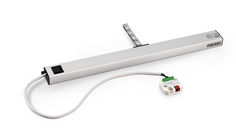
GEZE Slimchain and IQ box KNX
durchgeführt werden. àà Den neuesten Stand von Richtlinien, Normen und länderspezifischen Vorschriften beachten. XX XX Die IQ box KNX ist vor Bauschmutz und Wasser zu schützen. Die IQ box KNX ist ein Produkt des KNX-Systems und es werden detaillierte Fachkenntnisse durch KNX-Schulungen zum Verständnis vorausgesetzt. It is important to follow these instructions for the safety of persons. These instructions must be kept! àà Before assembly read enclosed safety instruction and carry out during assembly and drive operation! Warranty claims presuppose professional assembly, installation and maintenance according to the guidelines of the manufacturer. IQ box KNX UP àà Only qualified personnel may carry out mounting, function check and maintenance. GEZE shall not be liable for injuries or damage resulting from unauthorised modification of the equipment àà Use only original GEZE parts for repair and maintenance work as well. àà Make sure that the connection to the mains supply is made only by a qualified electrician. Power connection and ground conductor test must be performed in accordance with DIN VDE 0100-610. àà Observe the latest versions of guidelines, standards and countryspecific regulations. DE Beiblatt EN Supplementary sheet XX XX 164448-01 Kurzbeschreibung / Short description The IQ box KNX must be protected from building dirt and water. The IQ box KNX is a product of the KNX systems and detailed specialist know-how gained through KNX training is required for the product to be understood. Technische Daten / Technical data Die IQ box KNX ermöglicht das Steuern und Überwachen der GEZE IQ windowdrives (Slimchain, Powerchain etc.) über das KNX-Bus-System. Die Antriebe können auf gewünschte Positionen gefahren werden und es können die aktuelle Antriebsposition und diverse Zustände des Antriebs abgefragt werden. Zwei zusätzliche Eingänge können entweder für den Direktbetrieb (z.B. Handtaster) oder als Bus-Eingänge verwendet werden. Die Konfiguration erfolgt mit der KNX-Software ETS (ab Version … ). Die Produktdatenbank und detaillierte technische Beschreibungen sind zum Download auf der Internet-Seite www.geze.com. Ident-Nr. / ID-No. 164443 Busspannung KNX / Bus voltage KNX 30 V DC SELV *) The IQ box KNX makes the control and monitoring of the GEZE IQ windowdrives (Slimchain, Powerchain etc.) via the KNX-bus system possible. The drives can be moved to the required positions and the current drive position and various drive states can be requested. Two additional inputs can be used either for direct operation (e.g. manual push buttons) or as bus inputs. Configuration is done using the KNX software ETS (from version … ). The product database and detailed technical descriptions are available for downloading from the website www.geze.com. Sicherheitshinweise / Safety instructions Für die Sicherheit von Personen ist es wichtig, diesen Anweisungen Folge zu leisten. Diese Anweisungen sind aufzubewahren! àà Vor Montage beiliegende Sicherheitshinweise lesen und beachten! Gewährleistungsansprüche setzen eine fachgerechte Montage, Installation und Wartung nach den Angaben des Herstellers voraus. àà Nur Sachkundige dürfen Montage, Inbetriebnahme und Wartung durchführen. Eigenmächtige veränderungen an der Anlage schließen jede Haftung von GEZE für resultierende Schäden aus. àà Für Reparatur- und Wartungsaufgaben nur GEZE-Originalteile verwenden. àà Sicherstellen dass der Anschluss an die Netzspannung nur von einer Elektrofachkraft durchgeführt wird. Netzanschluss und Schutzleiterprüfung müssen entsprechend DIN VDE 0100-610 Versorgungsspannung IQ box KNX und Antriebe / 24 V DC, +-25%, SELV *) Supply voltage IQ box KNX and drives Max. Strom Antriebe / max. current drives 6A Eigenstromaufnahme an KNX-Bus Induced current intake to KNX-bus … mA Eigenstromaufnahme an 24V / Induced current intake to 24V 20 mA Schutzart / IP rating IP20 Schutzklasse / Protection rating III Umgebungstemperatur / Ambient temperature -5°C…+70°C Anschlussquerschnitt 24 V-Versorgung und Antriebe / Connection cross-section 24V supply and drives Anschlussquerschnitt Eingänge/Taster, starr oder flexibel ohne Aderendhülse / Connection cross-section push buttons, rigid or flexible without wire-end ferrule Anschluss KNX-Bus / KNX-bus connection max. 1,5 mm² Max. Leitungslänge Taster / Max. cable length for push button max. 0,5 mm² KNX-Anschlussklemme rot/ schwarz / KNX supply terminal red/ black 30 m Max. Gesamtleitungslänge Antriebe (LIN-BUS) / Max. overall cable length for drives (LIN-BUS) 50 m Maße / Dimensions 50 mm x 45 mm x 19 mm Montageort / Mounting location Gerätedose, Abzweigdose (DIN 49073 ) / Standard box, branch box (DIN 49073 ) *) SELV = Sicherheitskleinspannung / Safety extra-low voltage Elektrischer Anschluss / Electrical connection Anschlussplan IQ windowdrives ID 148327 beachten ! Nur verwendbar mit GEZE IQ windowdrives ab Software … . Heed the wiring diagram for IQ windowdrives ID 148327. Can only be used with GEZE IQ windowdrives from software version … onwards. *) Bei 24 V DC und langer Zuleitung muss das Kabel einen genügend großen Querschnitt aufweisen, um einen Spannungsabfall vorzubeugen. Querschnitt berechnen! … In the case of 24 V DC and a longer power supply line, the cable must have a sufficiently large cross-section in order to prevent a voltage drop. Calculate the cross-section. … max. … A + 230V AC … A B - + 24 V DC Die Gesamtkabellänge zwischen IQ box KNX und Fenster darf max. 50 m betragen. Bei Syncro- oder Verriegelungsantrieben zählen alle einzelnen Antriebsleitungen. Fenster / window S LIN - A B S L … A B S L … The overall cable length between IQ box KNX and window must not exceed max. 50 m. With Synchro or locking drives, all the individual drive cables count. GND +24V A B S L *) … IQ box KNX -+ COM 32 33 … 8 … 10 Taste Fenster ZU / Window OPEN key Taste Fenster AUF / Window CLOSED key Status LED (grün) / Status LED (green) … 5 … KNX Optional weitere Slaveantriebe (bei Syncro) oder Verriegelungsantriebe / Optional further Slave drives (with Syncro) or locking drives / Zusätzliche Abzweigdose für Anschluss mehrerer Antriebe / Additional branch box for the connection of several drives Netzteil 24V DC / 24V DC power supply IQ windowdrive Eingang S33 (Fenster ZU); parametrierbar / Input S33 (window CLOSED); parameters can be set Eingang S32 (Fenster AUF); parametrierbar / Input S32 (window OPEN); parameters can be set z. B. Lüftertaster LTA-24-AZ / e.g. Vent switch LTA-24-AZ … 4 … KNX + -- … 7 + -KNX Bedienelemente / Operating elements … 9 10 Dauerlicht / Continuous light: Blinken langsam / Slow flashing : Blinken schnell / Fast flashing: 11 12 11 12 Funktion ok / Function OK keine Kommunikation zum Antrieb / No communication to the drive Versorgungsspannung verpolt / Polarity of supply voltage reversed KNX Programmier-LED (rot) für Inbetriebnahme KNX-BUS / KNX programming LED (red) for commissioning KNX-BUS KNX Programmiertaste für Inbetriebnahme KNX-BUS / KNX programming key for commissioning KNX-BUS Zubehör / Accessories Material / Material Ident-Nr. / ID-No. Antriebe / Drives GEZE IQ windowdrives: ab SW … Slimchain, Powerchain, E 250 NT, E 90x, Power lock Lüftertaster / Vent switch LTA-24-AZ LTA-LSA ID 129393 ID 118476 Netzteile / Power supplies NT 1,1A-24 V UP NT 1,5A-24 V HS NT 2,5A-24 V HS NT 4,2A-24 V HS ID 151426 ID 151425 ID 151424 ID 151423 Testbetrieb / Test operation Nach Anschluss der Antriebe und der 24V-Versorgungsspannung kann mit Hilfe der Taste “Fenster AUF” (9) und der Taste „Fenster ZU“ (8) ein Probelauf der Antriebe durchgeführt werden, auch wenn das KNX-System noch nicht programmiert ist. Following connection of the drives and the 24V supply voltage, the key “Window OPEN” (9) and the key “Window CLOSED” (8) can be use to carry out a test run, even if the KNX system has not been programmed at this point. GEZE GmbH Reinhold-Vöster-Strasse 21–29 71229 Leonberg Germany Tel.: 0049 7152 203-0 Fax: 0049 7152 203-310 www.geze.com